Assignment 7
1. Task: Create a simple website and upload it to a web
hosting space. The completed steps are as follows:
(1) Download a responsive website template (Bootstrap
4)
Source: Template King
(2) Modify the website's title, encoding, heading, and
copyright statement.
(3) Create six hyperlinks on the website:
(3-1) Homepage: **index.htm**
(3-2) Task 1: Random Numbers
Note: Since the template is based on Bootstrap 4, you
must refer to the Bootstrap 4 website for instructions.
Generate a random number between 0 and 1: Math.random()
Generate a random number between 1 and 10 (Method 1): Math.ceil(Math.random() * 10)
Generate a random number between 1 and 10 (Method 2): Math.floor(Math.random() * 10) + 1
Bootstrap layout parameters: container — row — col-n (1
to 12)
<div class="container">
<div class="row">
<
div class=" col-5">產
<div
col-6 offset-1">
</div>
Note: A row can have a maximum of 12 columns
(col-12).
Each element's width can be defined, e.g., col-3 (occupies 3 spaces).
The space between elements can be controlled using offset, e.g., offset-3 (3
spaces between elements).
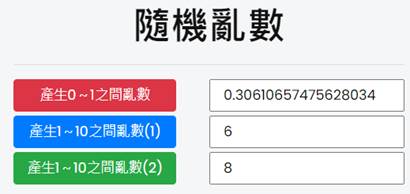
How to set up space layout in Bootstrap4
(3-3) Task 2: Draw Poker
Cards
Download poker card images.
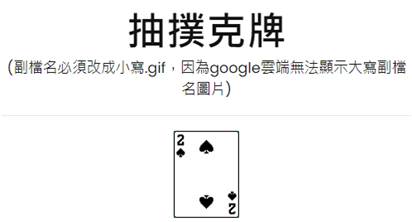
(3-4)
Task 3: Player vs Banker Poker Comparison
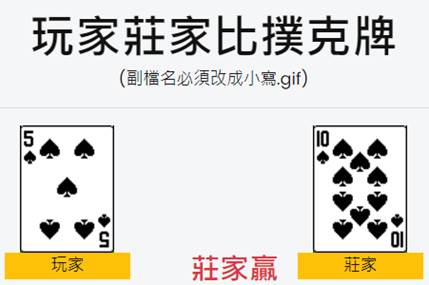
排版設定
1.兩個row:
<div class=”row”>
<div class=”row”>
Layout Settings:
1.Two rows:
<div class=”row”>
<div class=”row”>
2.Control the position of the
picture
<img class=”col-3 offset-1“
<img class=”col-3 offset-4“
col-3:
Indicates the element occupies 3 column spaces.
offset-1: Indicates the element is offset by 1 space from the previous one.
3. There
are two types of JavaScript variables:
Local
variable: n1
Global
variable: var n1
(3-5)
Task 4: Create multiple collapsible messages.

Reference:
Bootstrap Collapsible Components
Refer
to the method for creating one collapsible component, and then turn it into two
collapsible message components.
<a
class="btn btn-primary"
data-toggle="collapse" href="#collapseExample1" role="button"
aria-expanded="false" aria-controls="collapseExample1">
台灣人口數?
</a>
</p>
<div
class="collapse" id="collapseExample1">
<div class="card
card-body">
台灣人口有2300萬人
</div>
(5) Paste the URL into Zuvio
Submit the URL in the
assignment section on Zuvio to complete the task.